Run installation & AMC from one platform

CCTV Business Management Software for Dealers & Installation Companies

Manage leads, site visits, quotations, projects, material, installation, GST billing, service requests and AMC renewals — without switching between multiple tools.

  1. Lead
  2. Site Visit
  3. Quotation
  4. Installation
  5. Invoice
  6. AMC
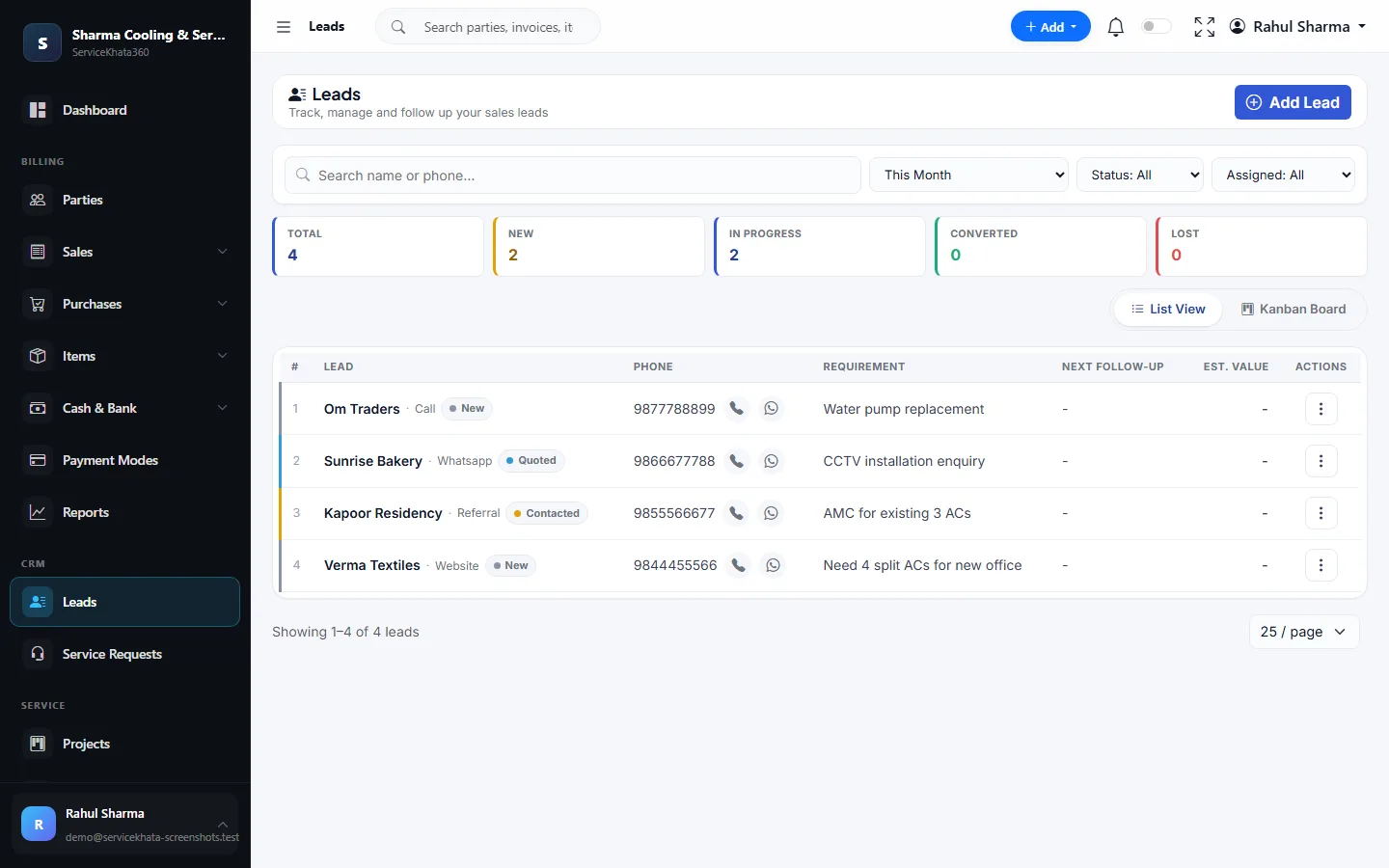
ServiceKhata360 leads screen showing a CCTV installation enquiry received on WhatsApp, marked Quoted
Real Leads screen — a WhatsApp enquiry for CCTV installation, already at the Quoted stage.
  • Built for Indian service businessesGST-ready billing & reports
  • CRM + Billing + Inventory + ServiceOne customer, one stock number, one ledger
  • 104 ready reportsPDF, Excel, CSV or print
  • Windows desktop + cloudSame business data on both
The everyday problem

Your CCTV Business Has More Than Just Installation Jobs.

One camera job touches sales, the store, technicians, accounts and after-sales service. When each part lives in a different place, details slip between them.

  • Enquiries arrive everywhere

    Calls and WhatsApp messages asking for cameras and site surveys sit in chats with no owner or next step.

  • Site visits go unrecorded

    Nobody can say who visited which site, what the customer needed, or what happened next.

  • Quotations sent as messages

    Camera, DVR, cable and labour prices typed into WhatsApp — then typed again into the bill.

  • Material leaves without a record

    Cameras, DVRs and cable go to site; what came back unused is a guess.

  • Billing and stock disagree

    The billing software and the stock register never quite match.

  • AMC and complaints drift

    "Camera offline" calls, contract visits and renewals live in a notebook or a spreadsheet.

How it works

From Enquiry to AMC Renewal — One Connected Workflow

This is the CCTV business journey from the ServiceKhata360 product catalogue. Every step happens in the same system and hands its data to the next.

  1. WhatsApp enquiryLead source
  2. Lead createdLeads
  3. Salesperson assignedLeads
  4. Site visit scheduledWork Assignment
  5. Visit recordedSales Visits
  6. Quotation createdEstimates
  7. Customer approvesEstimate → Accepted
  8. Project createdProjects
  9. Material dispatchedIssue Items
  10. Installation completedProject status
  11. GST invoiceTo Invoice
  12. Payment recordedPayment In
  13. AMC activatedAMC
  14. Service requestService Requests
  15. AMC renewalAMC · Expiring
Real screens, not mockups

See How ServiceKhata360 Handles Your Daily Work

Every screen below is a real ServiceKhata360 screen captured with demo data. Click any screenshot to enlarge it.

ServiceKhata360 lead details page with lead source, estimated value, assigned salesperson, next follow-up date and follow-up form
Leads & Follow-ups

Every enquiry has an owner and a next step

Each lead carries its source, estimated value, assigned salesperson, next follow-up date and a timeline of every conversation. Convert to Estimate carries it straight into a quotation.

More about Lead Management
ServiceKhata360 sales visits screen with check-in form and visit list showing check-in, check-out, outcome and status
Sales Visits

Site visits on record

Field staff check in to the site with purpose and contact, then check out with an outcome — so you see every survey visit with its times.

More about Sales Visit Tracking
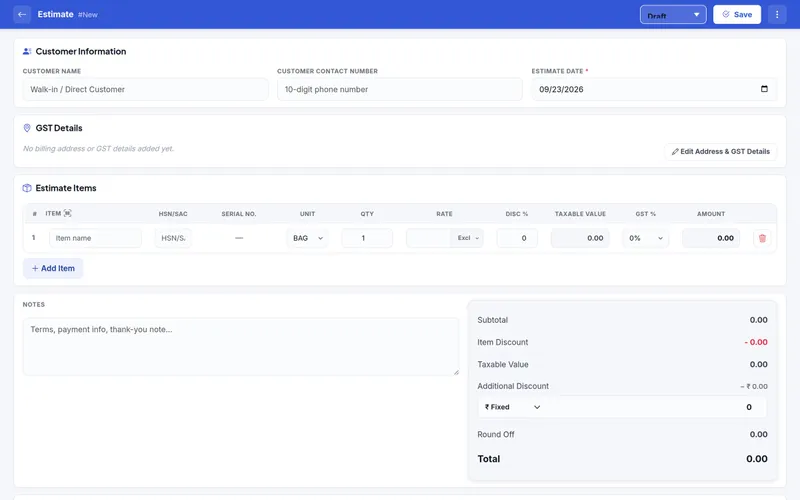
ServiceKhata360 new estimate form with item, HSN/SAC, serial number, unit, rate, discount and GST columns
Estimates

GST quotations for cameras, DVR, cable and labour

Itemised estimates with HSN/SAC, serial no., units, GST slabs, discounts and round-off. When the customer accepts, convert the estimate into the next stage without re-typing.

More about Estimates & Invoices
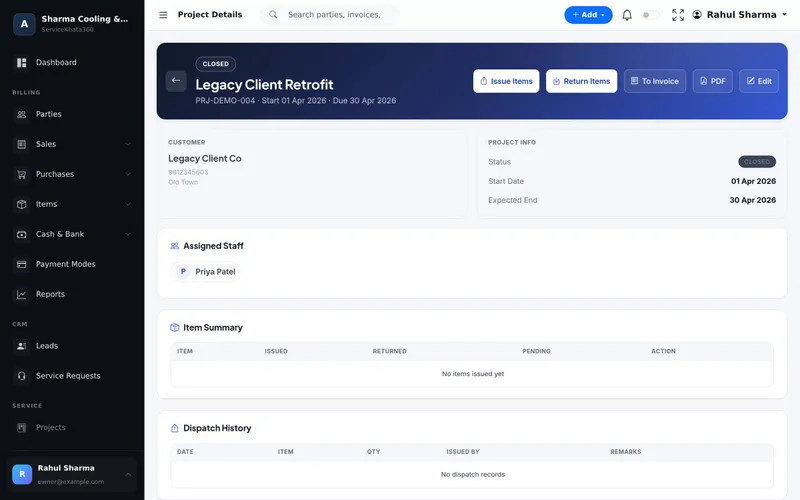
ServiceKhata360 project details page with Issue Items, Return Items, To Invoice and PDF actions
Projects

Installation jobs with material control

Each installation is a project with assigned staff. Issue Items sends material to site, Return Items records what comes back, and To Invoice bills the job.

More about Project Management
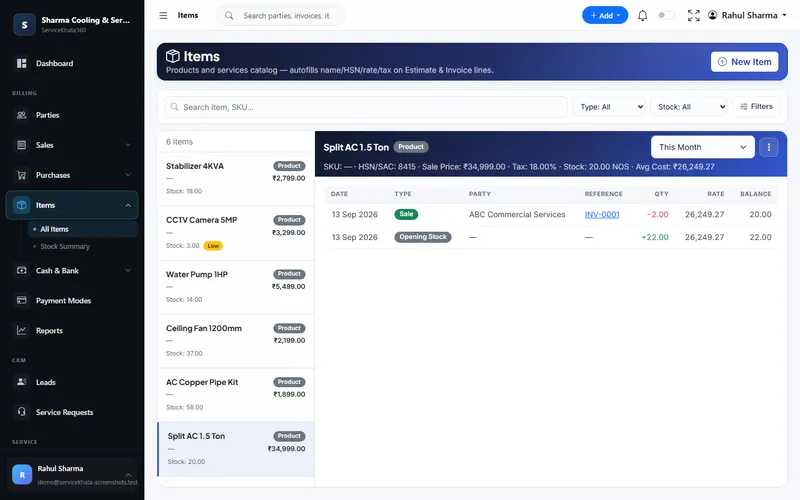
ServiceKhata360 items screen with CCTV camera flagged as low stock and a stock ledger linked to an invoice
Inventory

Know your cameras, DVRs and cable in stock

One live stock number per item. Purchases add, sales reduce, and each change is a dated ledger line linked to its bill — low-stock items like the 5MP camera here are flagged.

More about Inventory Management
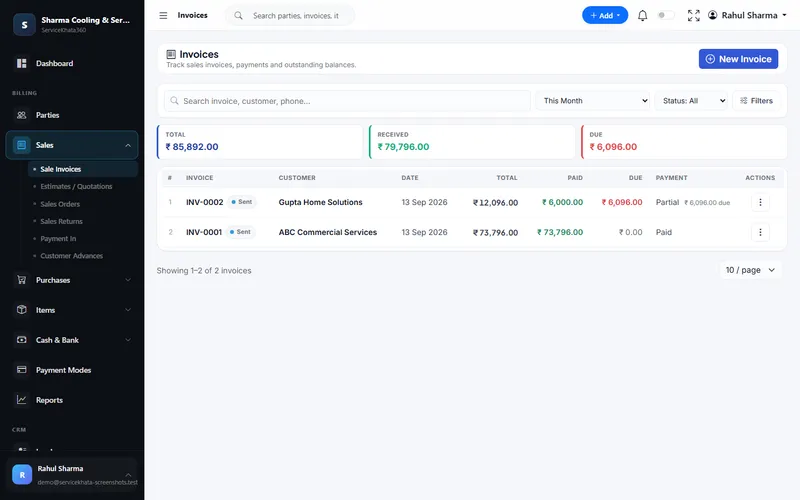
ServiceKhata360 invoices list showing total, received and due amounts with Paid and Partial status
GST Invoices

Bill the installation, track what is due

Raise the GST invoice after installation and see Paid, Partial or Unpaid on every bill, with the balance still due.

More about Billing & Accounting
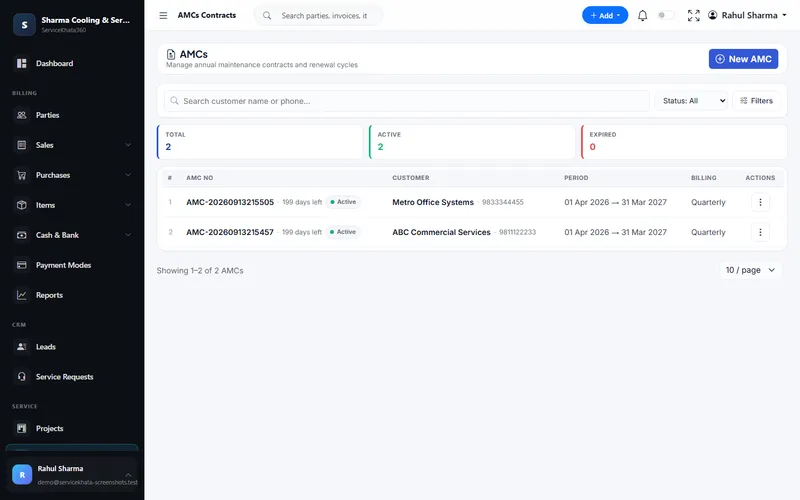
ServiceKhata360 AMC contracts list with days left, customer, contract period and billing cycle
AMC Contracts

Recurring revenue you can see

Keep contracts, covered assets, visits and renewals connected to the customer — every AMC shows its period, billing cycle and days left.

More about AMC Management
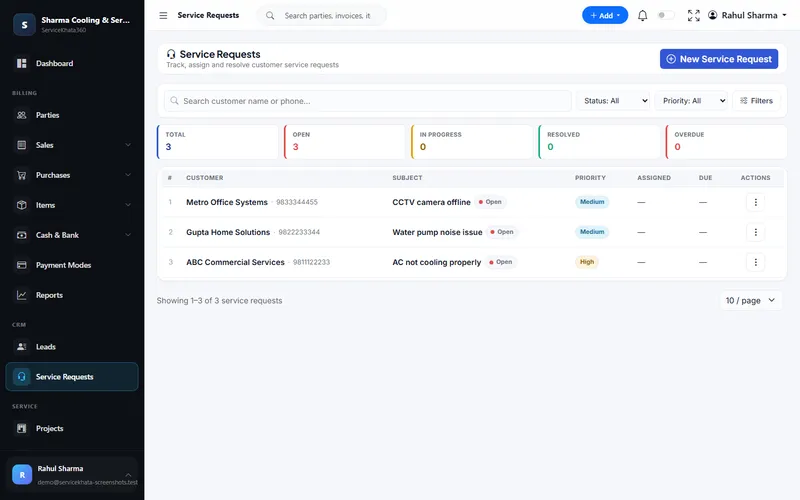
ServiceKhata360 service requests list with a CCTV camera offline complaint, priority and status
Service Requests

"CCTV camera offline" becomes a ticket

Complaints get a priority, an assigned technician and a due date, and are tracked from Open to Resolved against the customer.

More about Service Requests

Want to see these screens with your own items and customers? We'll set up a demo around your CCTV workflow.

Book a Free Demo
Why it matters

One Customer. One History. One System.

Lead, quotation, project, stock, invoice, payment, AMC and service requests attach to the same customer. When a camera goes offline a year later, the team can see what was billed, what is due and what the AMC covers before anyone calls the customer back.

Enter data once, and let it flow.

  1. Lead
  2. Quote
  3. Project
  4. Stock
  5. Invoice
  6. Payment
  7. AMC
  8. Service
What's included

Everything Your CCTV Business Uses Day to Day

All of these are part of the same platform — sharing one database, so nothing has to be reconciled by hand.

  • Lead management

    Source, status, owner, value and next follow-up for every enquiry.

  • Sales visit tracking

    Check-in, purpose, outcome and visit reports per salesperson.

  • GST estimates

    Itemised quotations that convert into invoices.

  • Projects

    Installation jobs with status, assigned staff and project PDF.

  • Material issue & return

    Issued, returned and pending quantities per item on each project.

  • Inventory

    Live stock and average cost for cameras, DVRs and accessories.

  • Stock movement ledger

    Every stock change linked to its purchase bill, invoice or return.

  • Serial number tracking

    Serial numbers per unit on estimates and invoices, with a Serial Number Report.

  • GST billing

    HSN/SAC, CGST/SGST/IGST, five print themes, PDF.

  • Payments & advances

    Receipts applied to invoices, kept as advances or recorded as other income.

  • Service requests

    Complaints with priority, technician, due date and activity log.

  • Work assignment

    Jobs with technician, priority, due date, live status and calendar.

  • AMC contracts

    Covered assets, covered services, visits, expiry alerts and renewal.

  • 104 reports

    Sales, stock, GST, service, AMC and staff — PDF, Excel or CSV.

  • WhatsApp automation

    Send invoices, estimates and AMC reminders when events happen.

  • Users & roles

    Granular permissions for sales, store, technicians and accounts.

Project management availability depends on your plan — our team will confirm what fits your business.

Business benefits

Built for the Way CCTV Businesses Actually Operate

  1. Stop losing enquiries

    Every call and WhatsApp enquiry becomes a lead with an owner.

  2. Keep follow-ups organised

    Next follow-up dates show up in Follow-ups Due on the dashboard.

  3. Quote faster

    Item catalogue autofills name, HSN/SAC, rate and tax on each line.

  4. Know your material stock

    One stock number per camera, DVR and cable roll.

  5. Track installation jobs

    Project status, assigned staff and material on one page.

  6. Connect billing with stock

    A sale reduces stock the moment it is billed.

  7. Keep service history

    Complaints and AMC visits stay with the customer.

  8. Manage AMC renewals

    Days left and an Expiring alert before contracts lapse.

  9. Know outstanding payments

    Paid, Partial and Due on every invoice and customer.

  10. See business performance

    Reports on sales, leads, projects, service and AMC.

Illustrative example

A CCTV Enquiry, From WhatsApp to AMC

A shop owner messages on WhatsApp asking for 8 cameras. Here is how that job moves through ServiceKhata360.

Illustrative scenario showing how existing ServiceKhata360 modules fit together — not a customer testimonial.

See this flow in a demo
  1. Lead created

    Source "WhatsApp", requirement "8 cameras for shop", estimated value noted.

  2. Salesperson assigned

    Owner and next follow-up date set on the lead.

  3. Site visit scheduled

    A work assignment for the survey with a due date and priority.

  4. Visit recorded

    Check-in, purpose and outcome logged in Sales Visits.

  5. Quotation created

    Cameras, DVR, cable and labour with HSN/SAC and GST — shared as a PDF.

  6. Customer approves

    The estimate is marked Accepted.

  7. Project created

    Installation project with an assigned technician.

  8. Material issued

    Cameras, DVR and cable issued to site; unused cable returned later.

  9. Installation completed

    Project status updated.

  10. GST invoice generated

    To Invoice on the project — no re-typing.

  11. Payment recorded

    The advance and balance applied to the invoice in Payment In.

  12. AMC activated

    Contract with covered cameras, scheduled visits and a renewal date.

Who it's for

A Good Fit For

  • CCTV installation companies
  • CCTV dealers & installers
  • Security system integrators
  • Small and medium security businesses
  • Businesses handling installation + AMC
  • Teams with separate sales, store and technician staff

One plan, every module

Plans include Billing, Accounting, Inventory, CRM & Sales, Service, Workforce and Automation — no separate add-ons. Some advanced items (for example Projects or extra firms) depend on the plan; our team will confirm what fits your business.

Questions

CCTV & Security — Frequently Asked Questions

Can ServiceKhata360 manage CCTV installation projects?
Yes. Create a project for each installation with the customer, assigned staff, dates and status (Planned, In Progress, On Hold, Completed, Closed). Issue material to the site, record returns, download the project PDF and convert the project into a GST invoice. Project availability depends on your plan.
Can I track CCTV inventory and material?
Yes. Cameras, DVRs, cable and accessories live in one item catalogue with live stock and average cost. Purchases increase stock, sales reduce it, and each movement links to its bill. On a project you see issued, returned and pending quantities per item, with a dispatch and return history.
Can I create GST quotations and invoices?
Yes. Estimates and invoices include HSN/SAC, GST slabs, CGST/SGST or IGST, discounts and round-off, and print in one of five themes with your logo, signature, stamp, bank details and UPI QR. An accepted estimate converts into an invoice without re-typing.
Can I manage CCTV AMC contracts?
Yes. Each AMC records its period, contract value, billing cycle, covered assets (with serial number and warranty expiry), covered services and visits. Contracts show days left, an expiring alert and a Renew AMC action.
Can my sales team track site visits?
Yes. Sales Visits lets field staff check in to a site with purpose and contact, and check out with an outcome. Managers see check-in and check-out times, and visit reports per salesperson.
Can technicians receive assigned jobs?
Yes. Work assignments give each job a technician, priority, due date and status — Assigned, Accepted, On The Way, In Progress, Waiting Parts, Completed. With a role limited to "view own", technicians sign in with their own account and see only their work.
Can I see a customer's full service history?
Yes. The customer's page shows invoices, payments and what is due, and their service requests and AMC contracts are linked to the same customer record.
Free live demo

Ready to Run Your CCTV Business From One Platform?

See ServiceKhata360 with your own workflow — leads, quotations, projects, stock, billing, service and AMC.

Mon–Sat · 10:00 AM – 6:00 PM IST

Get a Personalized Demo

A live walkthrough with your own workflow. We'll call you back within business hours.