How to Manage CCTV Service Complaints and Technicians
"Camera offline", "no recording", "mobile view not working" — a practical way to log CCTV complaints, assign the right technician, track the job to closure and keep service history.
Installations bring in new customers. Service decides whether they stay. A CCTV customer whose camera goes offline does not care how good the installation was — they care how fast someone came, whether the problem was fixed, and whether they had to call three times.
This guide covers a practical system for CCTV service complaints: logging them consistently, prioritising, assigning technicians, tracking the job and keeping service history.
The most common CCTV complaints
Knowing the usual problems helps you take the right details at intake and send a technician with the right parts:
- Camera offline / no video — power supply, connector, cable or camera failure
- No recording — hard disk failure, disk full settings, DVR/NVR date and time reset
- Mobile view not working — internet change, router replaced, app password changed
- Blurry or dark image — dirty lens, IR failure, moved camera
- Playback needed urgently — after a theft or incident
Step 1: Log every complaint as a ticket
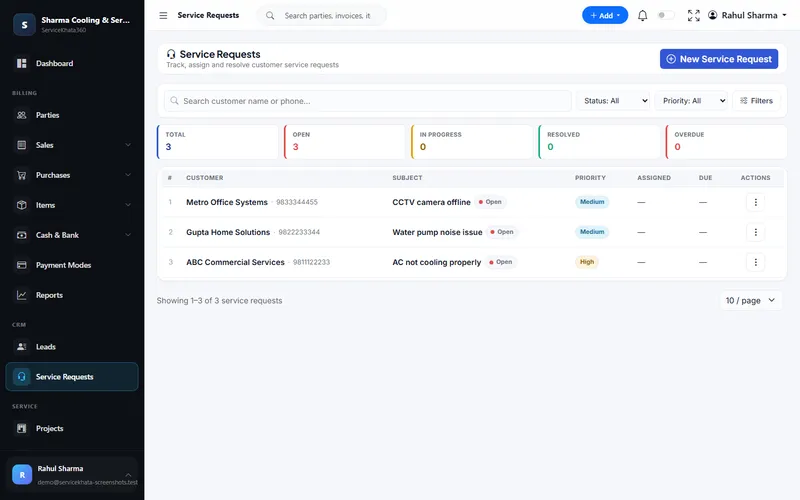
A complaint on a technician's personal WhatsApp is invisible to everyone else. Every complaint — phone, WhatsApp, email or walk-in — should become a service request with:
- Customer and site
- Subject in plain words: "Camera 3 offline – godown entrance"
- Priority and due date
- Whether the site is under AMC or warranty
- Assigned technician
Step 2: Prioritise by impact, not by who shouts loudest
Use four simple levels:
- Critical — whole system down at a business, or footage urgently needed after an incident
- High — several cameras down, or a key camera (entrance, cash counter)
- Medium — one camera down at a home, image quality issue
- Low — angle adjustment, mobile app help that can be done remotely
Set a due date that matches your promise, especially for AMC customers.
Step 3: Try remote first
Many mobile-view and settings complaints can be solved on a phone call. If it is fixed remotely, still record it on the ticket. It is service you delivered, and it counts at AMC renewal time.
Step 4: Assign the right technician
Assign by area, skill and current workload. An IP camera and network issue may need a different person than a coaxial cable fault. Before the technician leaves, they should know:
- What was installed at the site and when
- Previous complaints at the same site
- Whether the visit is chargeable
- Which spare parts to carry
Step 5: Track the job, not just the ticket
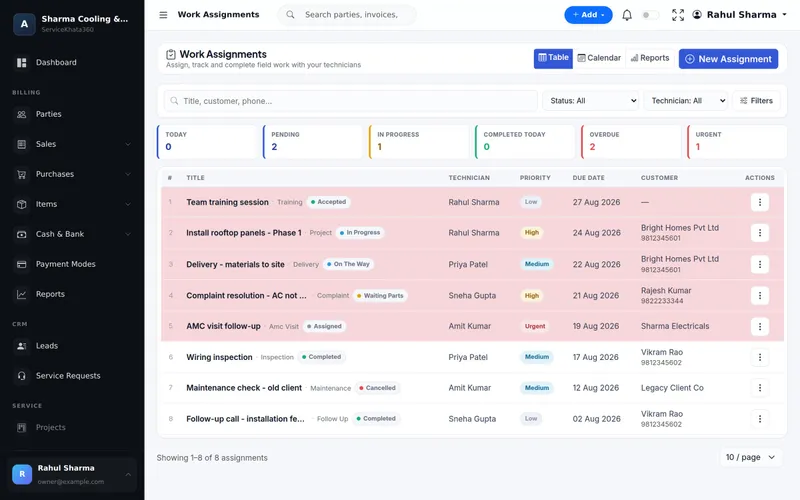
A visit has stages — assigned, accepted, on the way, in progress, completed. The most important stage to see is waiting for parts: those are the jobs customers will call about, and the ones most often forgotten.
Step 6: Close properly
Before closing:
- Record what was found and what was done.
- Record parts replaced — and bill them if they are not covered.
- Confirm with the customer that the system is working.
- Mark the ticket resolved, and closed once billing and confirmation are done.
Managing technicians fairly
A ticket system protects good technicians. When every job has a timestamped status and notes, you can see who resolves complaints on the first visit and who has the heaviest workload — instead of judging by who reports loudest. Useful weekly checks:
- Overdue tickets by technician
- Jobs waiting for parts for more than two days
- Sites with repeat complaints in the last 30 days
Repeat complaints usually point to an installation problem — a poor connector, an undersized power supply — that is worth fixing once.
Service history is your sales tool
When every complaint sits on the customer record, AMC renewals become easier and upgrade proposals become obvious. A site with an old DVR and five "no recording" complaints a year is a natural upgrade conversation. Read more in how to manage CCTV AMC customers without Excel.
How ServiceKhata360 helps
In ServiceKhata360, service requests have a subject, priority (Low to Critical), assigned technician, due date and status from Open to Resolved, with an activity log of comments and status updates. Work assignments track technician jobs through Assigned, Accepted, On The Way, In Progress, Waiting Parts and Completed, in a table or calendar. Technicians can sign in with their own account and, with "view own" permissions, see only their work. With your WhatsApp number linked, workflows can acknowledge a new complaint and send technician details when it is assigned.
See the full service flow on our CCTV business software page, or explore complaint management and work assignment.
Frequently Asked Questions
How should I prioritise CCTV complaints?
Can technicians see only their own jobs?
How do I know which complaints are overdue?
Looking for one system to manage your CCTV business?
See ServiceKhata360 with your own workflow — leads, quotations, projects, stock, billing, service and AMC.