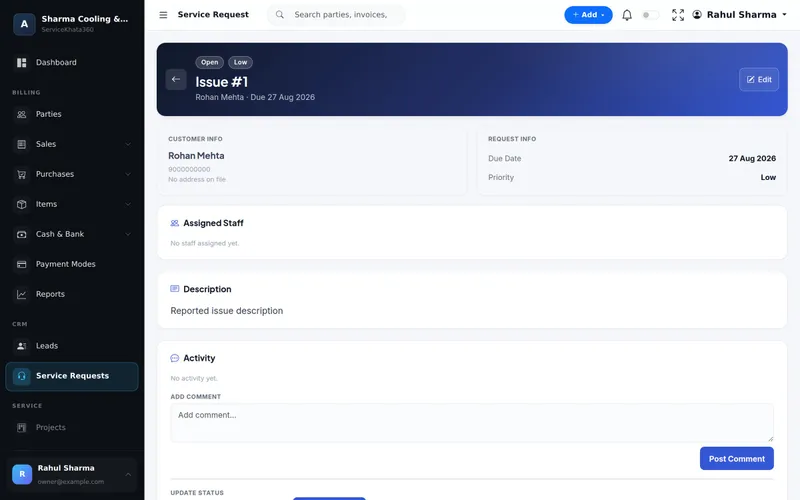
Service Request
One page per repair
Customer info, due date, priority, assigned staff, description and an activity log of comments and status updates.
More about Service RequestsWashing machines, refrigerators, microwaves, water heaters — log each complaint, assign a technician, track the visit and parts, bill the job and record the payment, all in one place.

Dozens of short jobs a day — each with a customer, an address, a technician, a part and a payment. Miss one link and the job, the part or the money goes missing.
Written on paper, or not written at all.
No shared view of who has which job today.
Repaired? Waiting for a part? Needs a second visit?
Spares go out of the store without reaching the bill.
Payments collected on visits are hard to reconcile.
Nobody remembers the last repair on the same machine.
The appliance repair workflow from the ServiceKhata360 catalogue — complaint, assignment, visit, parts, service and payment.
Every screen below is a real ServiceKhata360 screen captured with demo data. Click any screenshot to enlarge it.
Customer info, due date, priority, assigned staff, description and an activity log of comments and status updates.
More about Service Requests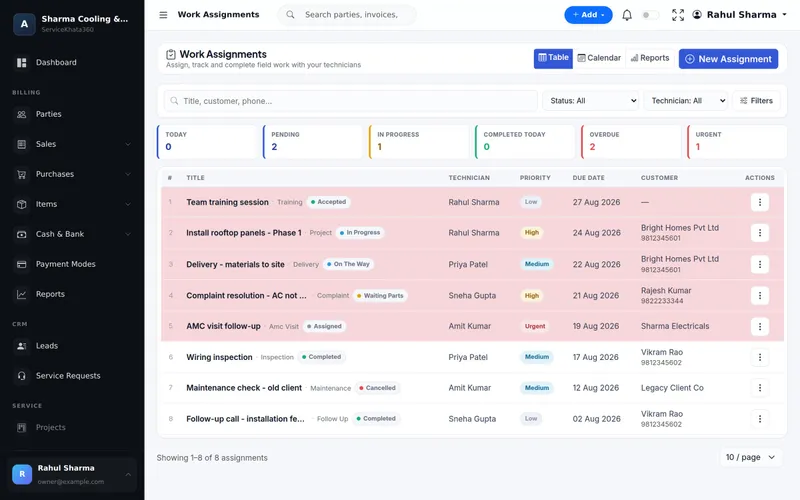
Each visit with technician, priority, due date and live status — Assigned, Accepted, On The Way, In Progress, Waiting Parts, Completed.
More about Work Assignment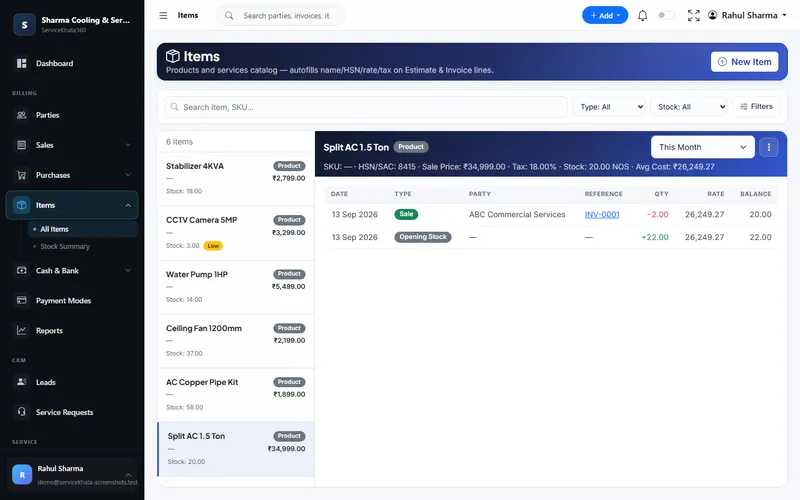
Every part with stock, sale price, tax and average cost; low-stock parts flagged; every movement linked to its bill.
More about Inventory Management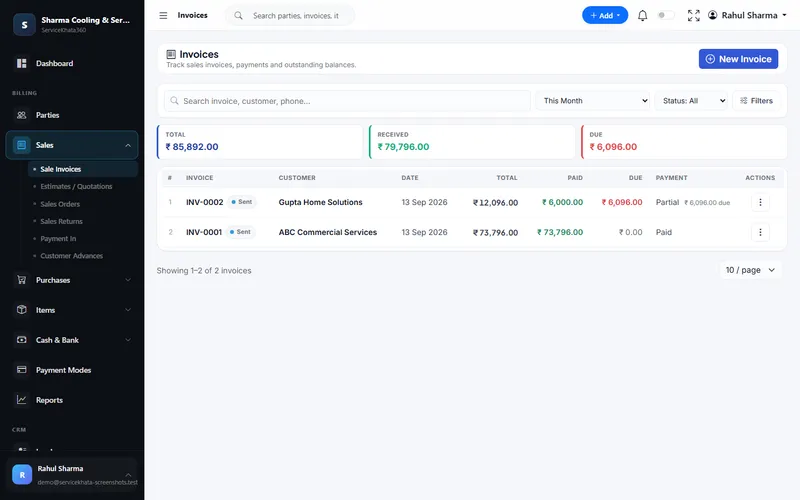
GST invoices with received and due amounts, and Paid, Partial or Unpaid per invoice.
More about Billing & Accounting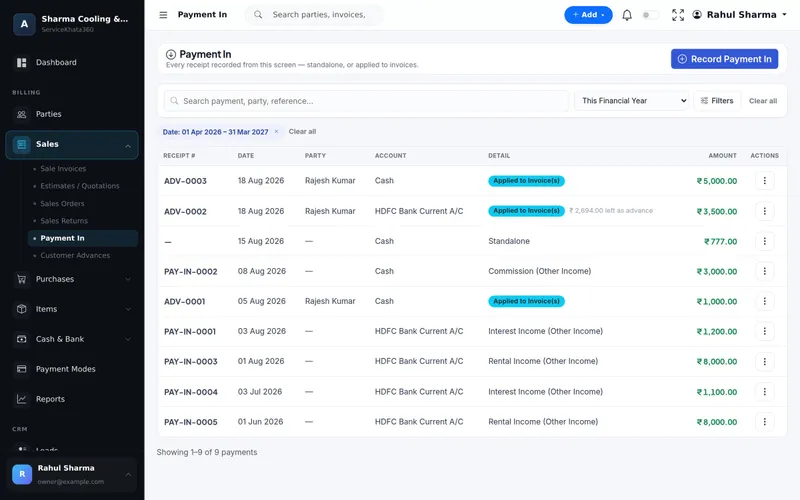
Each receipt against the invoice, in cash or a specific bank account, with automatic receipt numbers.
More about Billing & Accounting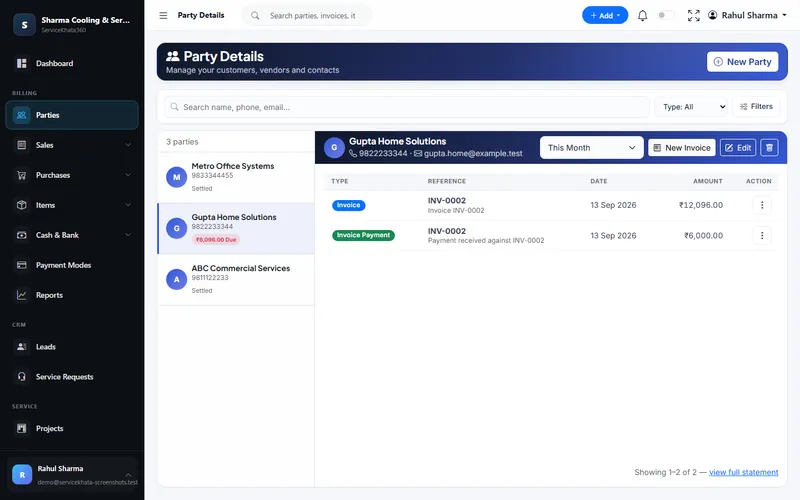
Every invoice and payment for the customer, with the amount still due.
More about Service CRMWant to see these screens with your own items and customers? We'll set up a demo around your appliance repair workflow.
Book a Free DemoComplaint, visit, parts, invoice and payment all land on one customer. When the same machine breaks again, the technician can see what was replaced and billed last time.
Enter data once, and let it flow.
All of these are part of the same platform — sharing one database, so nothing has to be reconciled by hand.
Complaints with priority, technician, due date and status.
Overdue counts and highlighted rows.
Visits per technician, with overloaded days visible.
On The Way, In Progress, Waiting Parts, Completed.
Live stock, average cost and low-stock alerts.
Parts purchases update stock and vendor balances.
Parts and service on one invoice.
Cash or bank receipts applied to invoices.
History, invoices and dues per customer.
Acknowledge complaints, send technician details.
Technician attendance with late marking.
By assignee, ageing, trend and resolution.
WhatsApp messages go out from your own WhatsApp number, linked to ServiceKhata360 with a one-time QR scan — our team helps you set it up during onboarding.
Every call becomes a request with a due date.
The calendar shows overloaded days.
Live status from Assigned to Completed.
Stock reduces when parts are billed.
Collections recorded against the right invoice.
Last repair and bill on the customer page.
WhatsApp acknowledgement and technician details.
Service and work assignment reports by staff.
An illustrative repair job using ServiceKhata360's real modules.
Illustrative scenario showing how existing ServiceKhata360 modules fit together — not a customer testimonial.
See this flow in a demoCustomer, subject and Medium priority.
"We've logged your request" sent on WhatsApp (once your number is linked).
Technician and due date set; technician details sent to the customer.
Status updated as the technician leaves.
Diagnosis noted: the drain pump needs replacing.
Job paused — the pump is not in stock.
The purchase bill adds the pump to stock.
Visit marked Completed; the request is Resolved.
Pump and service charge on one GST invoice.
Cash collected recorded in Payment In against the invoice.
One plan, every module
Plans include Billing, Accounting, Inventory, CRM & Sales, Service, Workforce and Automation — no separate add-ons. Some advanced items (for example Projects or extra firms) depend on the plan; our team will confirm what fits your business.
See ServiceKhata360 with your own workflow — complaints, technicians, visits, spare parts, billing and payments.
Mon–Sat · 10:00 AM – 6:00 PM IST