How to Manage CCTV AMC Customers Without Excel
Excel works for ten AMC contracts, not for a hundred. Here is a practical way to track CCTV AMC contracts, covered cameras, scheduled visits and renewals so recurring revenue does not slip.
For most CCTV businesses, AMC is the steadiest income they have. Installations come in waves; AMC money comes every year from customers you already know. Yet in many businesses the AMC list is a spreadsheet that one person updates when they remember to.
A spreadsheet is fine for ten contracts. At fifty or a hundred, it starts losing money quietly — through missed visits, forgotten renewals and complaints attended for free because nobody checked what the contract covered. This guide shows a better way to run CCTV AMC.
Why Excel breaks for CCTV AMC
It does not remind anyone
A column called "End date" does nothing on its own. Someone has to filter it, every week, and act on it. When that person is busy, contracts lapse and the customer calls a competitor the next time a camera goes offline.
It is disconnected from complaints
When a customer calls with "no recording on DVR", the technician needs to know: is this site under AMC, what equipment is covered, when was the last visit? If AMC lives in a spreadsheet and complaints live in WhatsApp, that check simply does not happen.
It does not track visits
Most AMCs promise a number of preventive visits. A spreadsheet rarely records whether visit two of four actually happened — until the customer refuses to renew because "you never came".
It is disconnected from billing
Quarterly or monthly AMC billing gets missed, or billed twice, when the contract and the invoices are in different places.
What every CCTV AMC record should contain
Whatever tool you use, each contract should have:
- Customer and site — one customer can have several sites; be specific.
- Contract period — start and end date.
- Contract value and billing cycle — one-time, monthly, quarterly or yearly.
- Covered equipment — cameras, DVR/NVR, hard disk, power supply, with serial numbers and warranty expiry where relevant.
- Covered services — for example preventive maintenance with the number of visits and how often.
- Exclusions — physical damage, hard disk replacement, cabling changes, shifting cameras. Write them down.
- Response commitment — if you promise a visit within 24 or 48 hours, record it.
A simple AMC operating routine
When the contract starts
- Create the contract with covered equipment and services.
- Schedule all preventive visits for the year — not just the first one.
- Raise the first invoice according to the billing cycle.
Every week
- Check visits due this week and assign them to technicians with due dates.
- Mark completed visits with remarks — what was checked, cleaned or replaced.
- Mark skipped visits honestly, with the reason (customer not available, site closed).
Every month
- Review contracts expiring in the next 30–45 days.
- Prepare renewal quotations — add new cameras installed during the year.
- Check complaints under AMC per customer. A site with many complaints may need a hardware upgrade proposal, not just a renewal.
What a preventive CCTV visit should cover
A visit that only "checks the cameras" does not justify the AMC fee. A useful checklist includes:
- Every camera live and recording; image clarity day and night
- Lens and dome cleaning; camera angle still covering the intended area
- Recording retention — how many days the hard disk actually holds
- Hard disk health and DVR/NVR date and time
- Remote viewing on the customer's phone
- Power supply, connectors and exposed cable condition
- Default passwords changed
Record the findings against the visit. When renewal time comes, that record is your proof of value.
Handling complaints under AMC
When a complaint comes in, the first question should be "is this under AMC, and is this covered?" Log the complaint as a service request against the same customer, check the contract, and set priority accordingly. Our guide on managing CCTV service complaints and technicians covers the full process.
Renewals: start early, bring data
A renewal conversation goes better when you can say: "We did four visits this year, attended three complaints, replaced one hard disk, and your system recorded without a break." That conversation needs records, not memory.
How ServiceKhata360 handles CCTV AMC
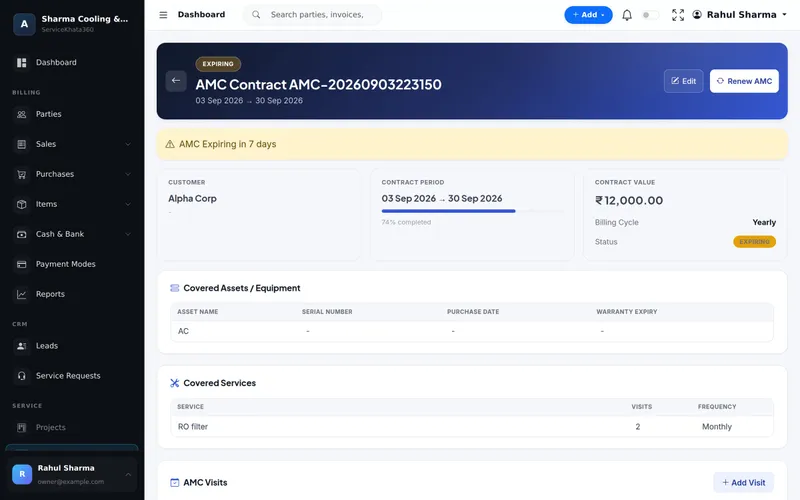
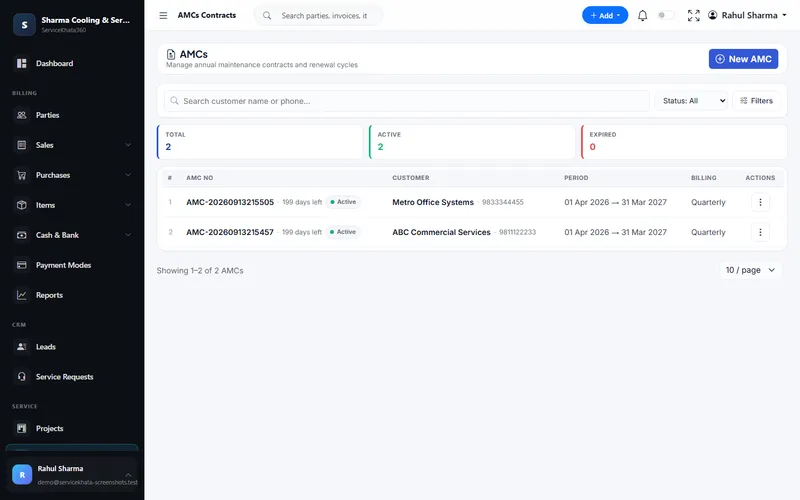
In ServiceKhata360, each AMC records its period, contract value, billing cycle, covered assets with serial numbers and warranty expiry, covered services with number of visits and frequency, and AMC visits with the technician and Pending, Completed or Skipped status. Contracts show days left and an Expiring alert, and Renew AMC starts the next term from the same contract. Service requests and invoices sit on the same customer record.
If you link your WhatsApp number to ServiceKhata360 (a one-time QR scan), an automation workflow can also send renewal reminders when a contract is about to expire.
See how AMC fits the complete CCTV workflow on our CCTV solution page, or read more about the AMC management module.
Key takeaways
- AMC is recurring revenue — treat it like a system, not a list.
- Record covered equipment, services, visits and exclusions on every contract.
- Schedule all preventive visits at the start, and record what each visit found.
- Connect complaints and invoices to the contract.
- Start renewals a month before expiry, with a record of the work you did.
Frequently Asked Questions
What should a CCTV AMC contract record?
How early should I start the AMC renewal conversation?
Can ServiceKhata360 send AMC renewal reminders on WhatsApp?
Can I bill AMC monthly or quarterly instead of yearly?
Looking for one system to manage your CCTV business?
See ServiceKhata360 with your own workflow — leads, quotations, projects, stock, billing, service and AMC.