How CCTV Dealers Can Track Installation Leads and Follow-Ups
Most lost CCTV jobs are not lost on price — they are lost because nobody followed up. A simple lead process for CCTV dealers: capture, qualify, survey, quote and follow up on time.
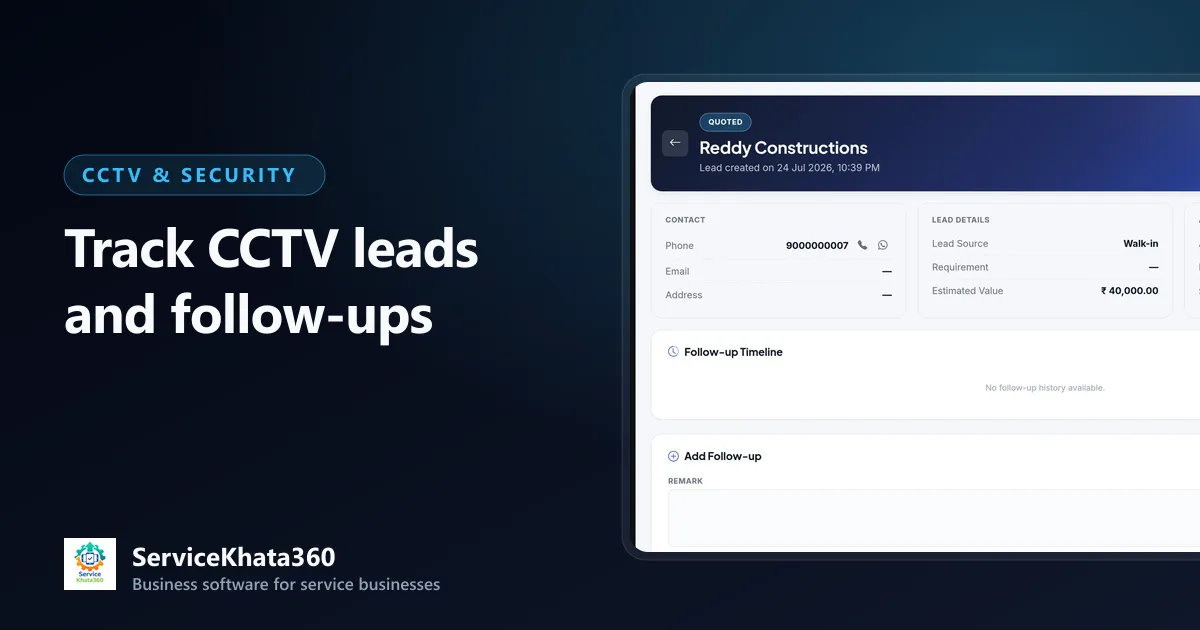
Most CCTV dealers do not lose jobs because their price is too high. They lose them because the customer asked for a quotation on Monday, received it on Thursday, and never heard from anyone again. By the time someone remembered to call, the cameras were already installed — by someone else.
Lead management sounds like a sales-team topic, but for a CCTV dealer it is simply this: every enquiry gets an owner, a next step and a date. Here is a practical way to do it.
Step 1: Capture every enquiry in one place
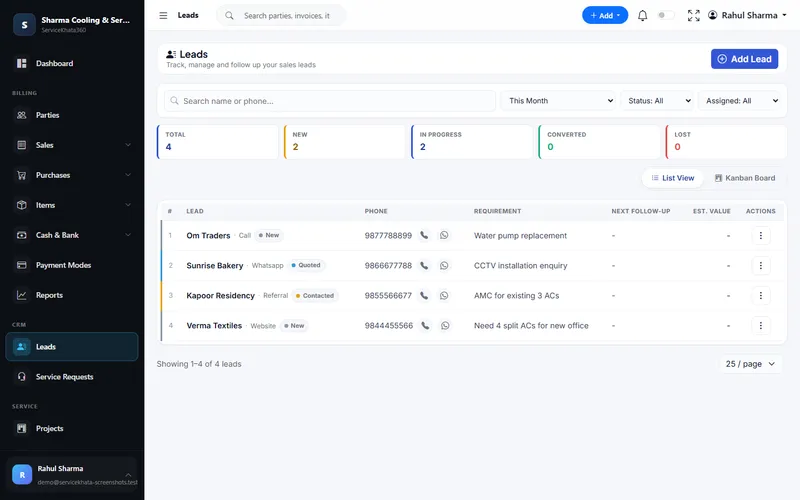
CCTV enquiries come from everywhere — WhatsApp, phone calls, walk-ins, referrals from existing customers, builders, electricians and your website. The source does not matter; what matters is that each one is written down within the hour, in one list.
For each lead, record:
- Name and phone — and the site location
- Source — call, WhatsApp, referral, website, walk-in
- Requirement — "8 cameras for shop", "4 cameras for home with mobile view"
- Estimated value — even a rough figure helps you prioritise
- Assigned salesperson — one owner, not "everyone"
- Next follow-up date — never leave this empty
Step 2: Qualify quickly
Not every enquiry deserves a site survey. A short qualifying call saves your team's day. Ask:
- Home, shop, office, warehouse, school or society?
- Roughly how many cameras and which areas?
- Indoor, outdoor or both? Night vision needed?
- New installation or replacement of an old system?
- Mobile viewing, audio, longer recording days?
- When do they want it done?
Small residential jobs can often be quoted over the phone with photos on WhatsApp. Larger commercial jobs need a survey.
Step 3: Schedule and record the site survey
A survey that is not recorded did not happen. Note who visited, when, what the customer wanted, the cable routes, the DVR/NVR location, power availability and any special requirement. Record the outcome — interested, needs revised quote, not interested.

Step 4: Quote fast, and quote clearly
Speed matters. A customer who has three dealers visiting will often go with the first clear quotation. Build quotations from a standard item list so they take minutes, not an evening. Our CCTV quotation and billing guide explains what to include.
Once the quotation is sent, move the lead to "Quoted" and set the next follow-up date — typically two or three days later.
Step 5: Follow up with a reason
A follow-up call that only says "any update?" rarely helps. Give the customer a reason to talk:
- Offer to walk them through the quotation line by line.
- Offer an alternative — IP instead of analog, or fewer cameras with better placement.
- Answer the question they have not asked: warranty, service response, AMC.
- If they are comparing quotes, ask what the other quote includes. Often it is a different hard disk size or cable type.
After every call, write one line: what was said, and the next date. That one line lets anyone in your team continue the conversation.
Step 6: Close the loop — won or lost
When the customer says yes, mark the lead as converted and move straight to the installation. When they say no, mark it as lost and record why — price, chose another brand, postponed. Postponed leads deserve a follow-up date months later; many come back.
The five lead statuses you need
Keep the stages simple enough that your team will actually update them:
- New — just received, not yet contacted
- Contacted — spoken to, qualifying or survey planned
- Quoted — quotation sent, follow-up running
- Converted — order confirmed
- Lost — closed, with a reason
The daily habit that changes everything
Every morning, each salesperson opens one list: follow-ups due today. Every evening, nothing on that list should be left without either an update or a new date. That single habit recovers more business than any discount.
Doing it in ServiceKhata360
In ServiceKhata360, every lead has a source, status, assigned salesperson, estimated value and next follow-up date, with a timeline of follow-up remarks. Leads due for follow-up appear on the dashboard. Sales Visits records site surveys with check-in, purpose and outcome, and Convert to Estimate carries the lead into a GST quotation without re-typing. If you link your WhatsApp number, a workflow can also send an automatic reply when a new lead is created.
See how leads connect to installation, billing and AMC on the ServiceKhata360 CCTV solution, or read about lead management and sales visit tracking.
Frequently Asked Questions
What lead statuses should a CCTV dealer use?
How often should I follow up on a CCTV quotation?
Should I record the reason when a lead is lost?
Looking for one system to manage your CCTV business?
See ServiceKhata360 with your own workflow — leads, quotations, projects, stock, billing, service and AMC.