Projects, inventory, billing & AMC together

Solar Business Management Software

Track every rooftop or inverter job from the first enquiry and site survey through quotation, material dispatch, installation, GST invoice and after-sales AMC.

  1. Lead
  2. Site Survey
  3. Project
  4. Material
  5. Installation
  6. Invoice
  7. AMC
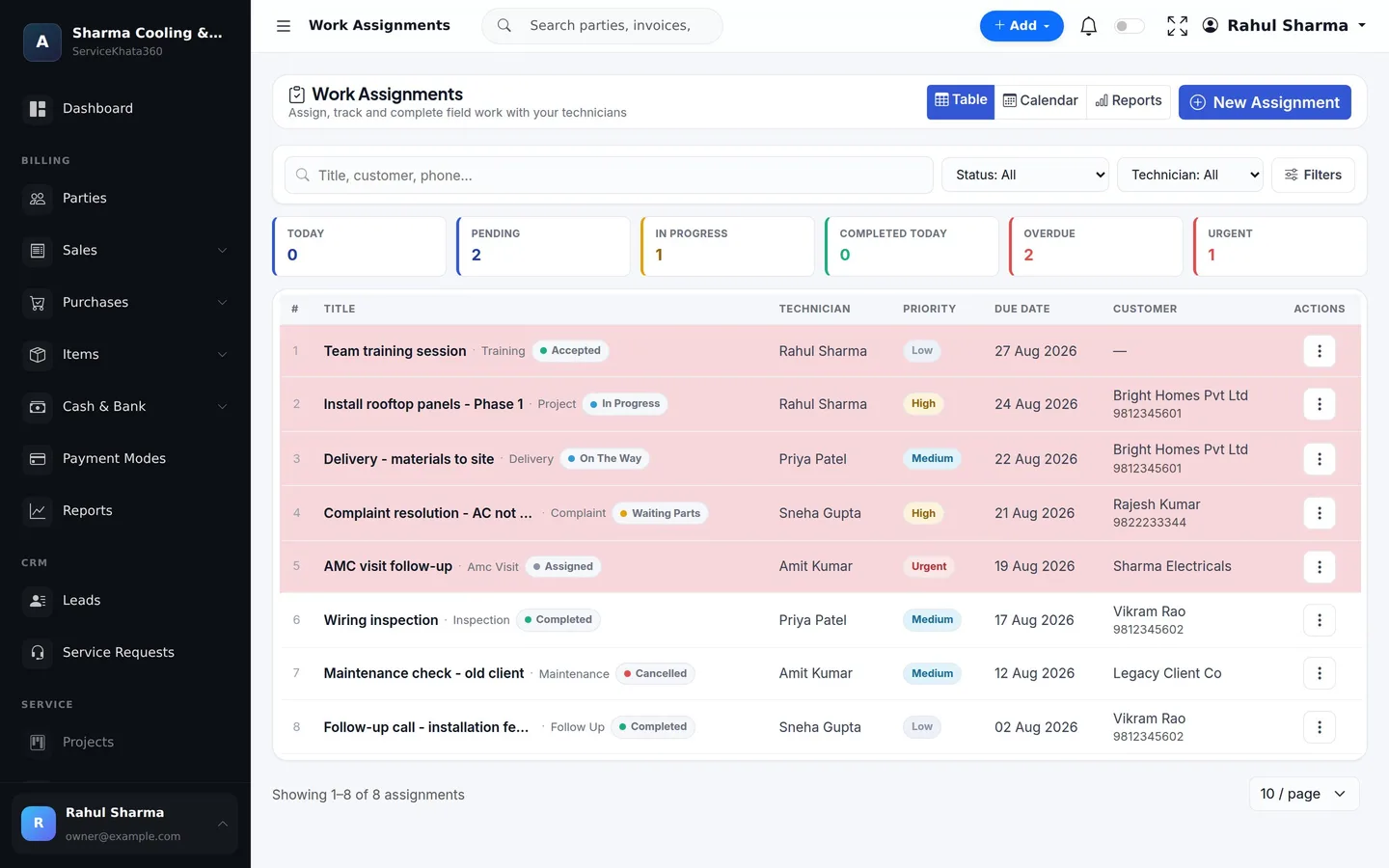
ServiceKhata360 work assignments with Install rooftop panels Phase 1 in progress and Delivery materials to site on the way
Real work assignments — "Install rooftop panels – Phase 1" in progress, "Delivery – materials to site" on the way.
  • Built for Indian service businessesGST-ready billing & reports
  • CRM + Billing + Inventory + ServiceOne customer, one stock number, one ledger
  • 104 ready reportsPDF, Excel, CSV or print
  • Windows desktop + cloudSame business data on both
The everyday problem

A Solar Job Is a Project, Not a One-Line Bill.

Panels, inverters, structures and cable move from your store to the roof over several days. Without project-level records, material goes missing and billing waits.

  • Long sales cycles

    The customer says "call after Diwali" and the follow-up depends on one person's memory.

  • Site surveys unrecorded

    Roof details and outcomes live in a salesperson's phone.

  • Large quotations by hand

    Panels, inverter, structure, cable and labour priced line by line, every time.

  • Material on the move

    What went to site, what was used and what came back is unclear.

  • Advances not tracked

    Money received before installation gets lost by the time the final bill is made.

  • After-sales forgotten

    Servicing and complaints after installation are handled from memory.

How it works

From Lead to AMC — One Connected Workflow

The solar workflow from the ServiceKhata360 catalogue — lead, site survey, project, material, installation, invoice and AMC — with advances and stock in the same system.

  1. LeadLeads
  2. Follow-upLeads
  3. Site surveySales Visits / Work Assignment
  4. QuotationEstimates
  5. Advance receivedPayment In
  6. Project createdProjects
  7. Material issuedIssue Items
  8. InstallationWork Assignment
  9. Unused material returnedReturn Items
  10. GST invoiceTo Invoice
  11. Advance appliedPayment In
  12. AMCAMC
Real screens, not mockups

See How ServiceKhata360 Handles Your Daily Work

Every screen below is a real ServiceKhata360 screen captured with demo data. Click any screenshot to enlarge it.

ServiceKhata360 lead details with estimated value, next follow-up date and add follow-up form
Leads & Follow-ups

Long follow-ups that never drop

Log each conversation with a remark, a status and the next date. On that day the lead appears in Follow-ups Due on the dashboard — any salesperson can pick it up with full context.

More about Lead Management
ServiceKhata360 sales visits with check-in form and visits showing outcome and status
Sales Visits

Site surveys on record

Check in at the site, note the contact and purpose, and check out with an outcome such as Interested or Order Placed.

More about Sales Visit Tracking
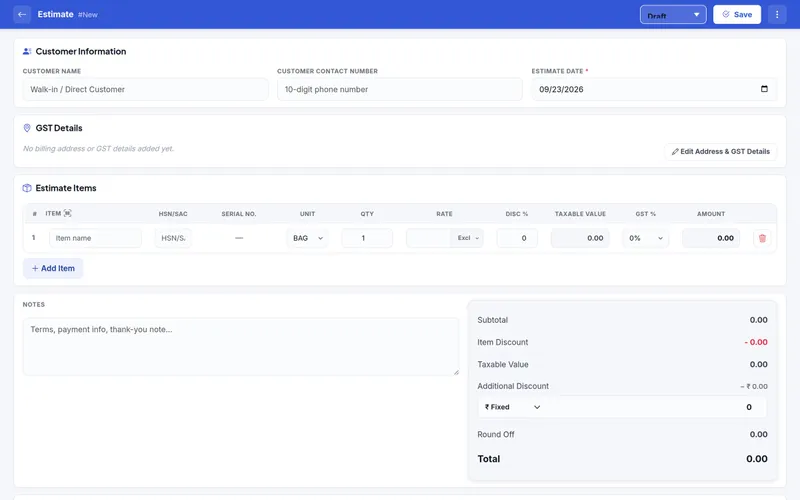
ServiceKhata360 estimate form with item, HSN/SAC, serial number, quantity, rate and GST columns
Estimates

Quote the whole system on one estimate

Panels, inverter, structure, cable and installation as itemised GST lines with HSN/SAC, discounts and round-off.

More about Estimates & Invoices
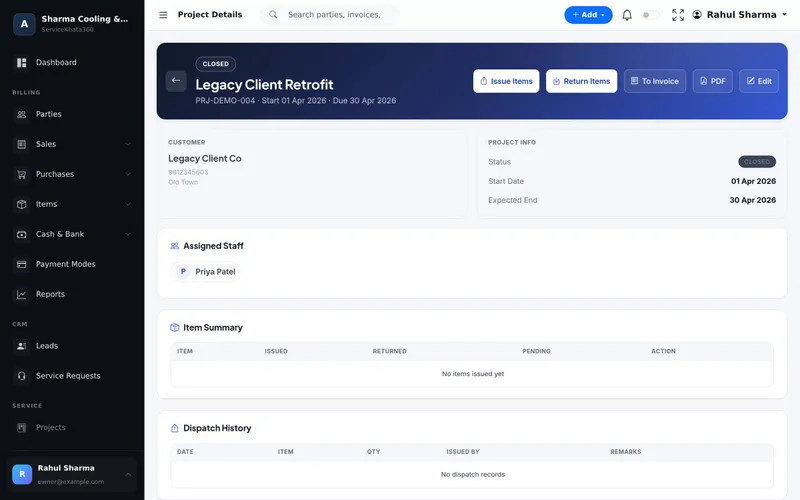
ServiceKhata360 project details with Issue Items, Return Items, To Invoice, item summary and dispatch history
Projects

Material issued, returned and billed per project

Issue Items to the site, Return Items with their condition, see issued, returned and pending per item — then To Invoice.

More about Project Management
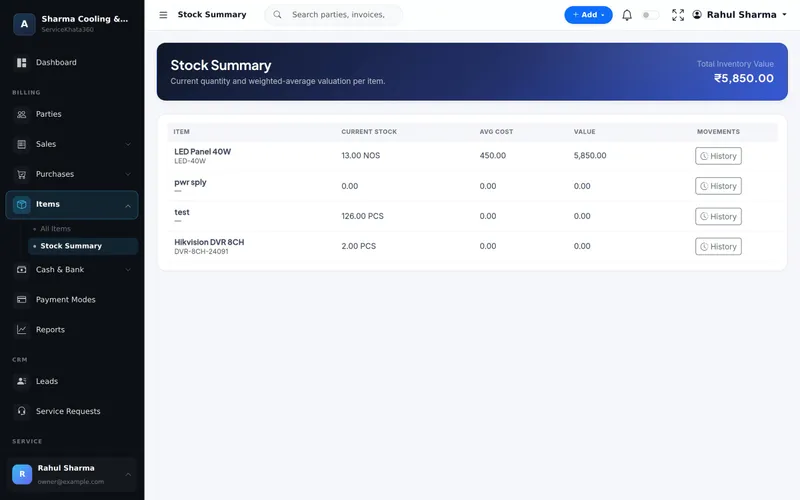
ServiceKhata360 stock summary with current stock, average cost, value and movement history per item
Stock Summary

Stock value you can trust

Current quantity and weighted-average cost per item with total inventory value, and a History link to each item's movements.

More about Inventory Management
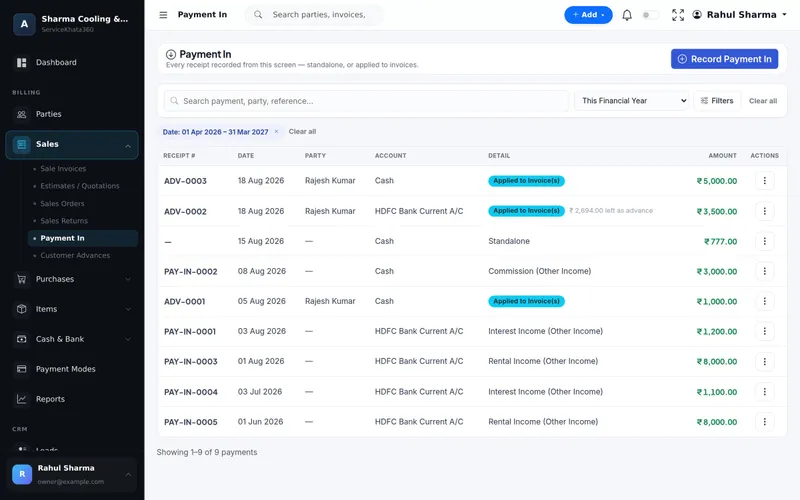
ServiceKhata360 payment in list with advance receipts applied to invoices and balance left as advance
Advances & Payments

Advances that find their invoice

Record an advance before work starts. When the invoice is raised, it is applied — and cash/bank statements and the Day Book reflect it.

More about Billing & Accounting
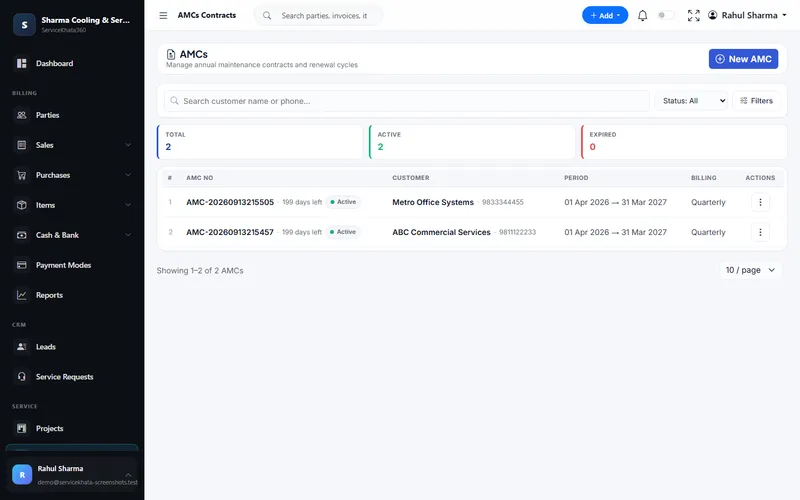
ServiceKhata360 AMC contracts list with contract period, days left and billing cycle
AMC Contracts

After-sales service as recurring revenue

Contracts with period, billing cycle and days left, connected to the customer who bought the system.

More about AMC Management

Want to see these screens with your own items and customers? We'll set up a demo around your solar workflow.

Book a Free Demo
Why it matters

One Customer. One History. One System.

Lead, survey, quotation, advance, project material, invoice and AMC sit on one customer record — so after-sales calls start with what was installed and billed, not with questions.

Enter data once, and let it flow.

  1. Lead
  2. Survey
  3. Quote
  4. Advance
  5. Project
  6. Invoice
  7. AMC
What's included

Everything Your Solar Business Uses Day to Day

All of these are part of the same platform — sharing one database, so nothing has to be reconciled by hand.

Project management availability depends on your plan — our team will confirm what fits your business.

Business benefits

Built for the Way Solar Businesses Actually Operate

  1. Long sales cycles, handled

    Dated follow-ups that any salesperson can pick up.

  2. Surveys on record

    Every site visit with time, purpose and outcome.

  3. Quote big systems quickly

    Catalogue items autofill HSN/SAC, rate and tax.

  4. Advances applied correctly

    Money received early is applied to the final invoice.

  5. Material accounted for

    Issued, returned and pending per project.

  6. Bill the project in one click

    To Invoice turns the project into a GST invoice.

  7. Cost stays accurate

    Purchase bills update stock and average cost.

  8. After-sales stays connected

    AMC and complaints on the same customer.

Illustrative example

A 5 kW Rooftop Project, Start to Finish

Based on the solar examples in the ServiceKhata360 catalogue.

Illustrative scenario showing how existing ServiceKhata360 modules fit together — not a customer testimonial.

See this flow in a demo
  1. Lead

    A factory owner enquires about a 5 kW rooftop system.

  2. Follow-up

    "Call after Diwali" logged with a remark and the next date.

  3. Site survey

    Recorded as a sales visit with the outcome "Interested".

  4. Quotation

    Panels, inverter, structure, cable and installation with GST.

  5. Advance

    ₹50,000 recorded in Payment In as a customer advance.

  6. Project

    Project created with assigned staff.

  7. Material issued

    Panels, inverter, structure and cable issued to the site.

  8. Installation

    "Install rooftop panels" moves from In Progress to Completed.

  9. Return

    Two unused cable rolls returned.

  10. Invoice

    To Invoice — the advance is applied and the balance shows as due.

  11. AMC

    An AMC contract for periodic servicing after installation.

Who it's for

A Good Fit For

  • Rooftop solar installers
  • Small and mid-size solar EPC teams
  • Inverter & battery dealers who install
  • Businesses running installation projects plus after-sales service

One plan, every module

Plans include Billing, Accounting, Inventory, CRM & Sales, Service, Workforce and Automation — no separate add-ons. Some advanced items (for example Projects or extra firms) depend on the plan; our team will confirm what fits your business.

Questions

Solar / Inverter — Frequently Asked Questions

Can I manage solar installation projects?
Yes. Each project has a customer, assigned staff, start and expected end dates, and a status — Planned, In Progress, On Hold, Completed or Closed — with Issue Items, Return Items, To Invoice and a project PDF. Project availability depends on your plan.
Can I track panels, inverters and cable issued to a site?
Yes. The project's item summary shows issued, returned and pending quantities per item, and the dispatch and return history records the date, item, quantity and who issued or received it.
Can I record advance payments before installation?
Yes. Record the advance in Payment In; it shows on the customer's balance and is allocated against the invoice later, with fully or partially allocated status.
Can I record site surveys?
Yes. Record a survey as a sales visit with check-in, purpose and outcome, or schedule it as a work assignment of type Inspection for a technician.
Can I convert a solar project into a GST invoice?
Yes. To Invoice on the project creates the GST invoice, with HSN/SAC and tax breakup.
Can I offer AMC after installation?
Yes. Create an AMC for the customer with covered assets, covered services, visits, billing cycle and renewal tracking.
Free live demo

Ready to Run Your Solar Business From One Platform?

See ServiceKhata360 with your own workflow — leads, site surveys, quotations, projects, material, billing and AMC.

Mon–Sat · 10:00 AM – 6:00 PM IST

Get a Personalized Demo

A live walkthrough with your own workflow. We'll call you back within business hours.