How to Manage RO Service Calls and Technician Assignments
From "low water flow" to "leaking from the bottom" — how to register RO complaints consistently, assign technicians by area and workload, track job status and build a service history that makes the next visit easier.
"Water is coming slowly." "Machine is making noise." "Leaking from the bottom." An RO service business receives these calls every day, on the office phone, the owner's mobile and WhatsApp. The work itself is usually quick. What goes wrong is everything around it: a call that nobody wrote down, a technician who went to the wrong address, a customer who calls back three times asking "when will someone come?"
This guide covers how to register RO complaints properly, assign them to technicians, track status through the day and build a service history that makes the next visit easier.
Step 1: Register every complaint the same way
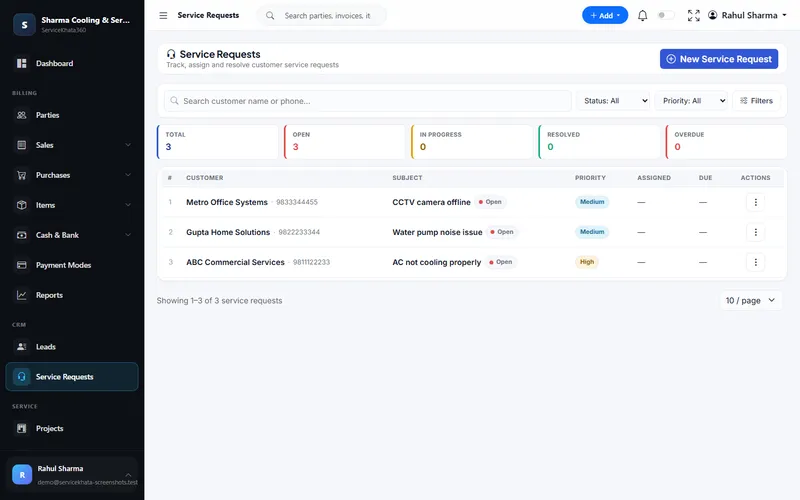
The quality of a service call is decided at intake. Whoever takes the call should capture the same details every time:
- Customer — search by mobile number first, so the complaint is added to the existing record
- Address and landmark — confirm it even for old customers; people move
- The purifier — brand, model, and whether it is under warranty or AMC
- The problem in the customer's words — "low flow since two days", "bad taste after the water tanker"
- Preferred visit time — many homes are locked during working hours
Write a short, specific subject line. "Low water flow — kitchen RO" is far more useful to a technician and to your reports than "Complaint".
Step 2: Set priority and a realistic due date
Not every RO call is equally urgent. A simple priority rule helps the office decide quickly:
- Critical — water leaking, purifier at a clinic, school or office with no drinking water
- High — no water output, machine not starting, AMC customer
- Medium — low flow, noise, taste complaints
- Low — routine filter change requests, general enquiries
Then set a due date you can keep. Promising "today" to every caller and missing half of them does more damage than promising "tomorrow before noon" and arriving on time.
Step 3: Assign technicians by area, skill and workload
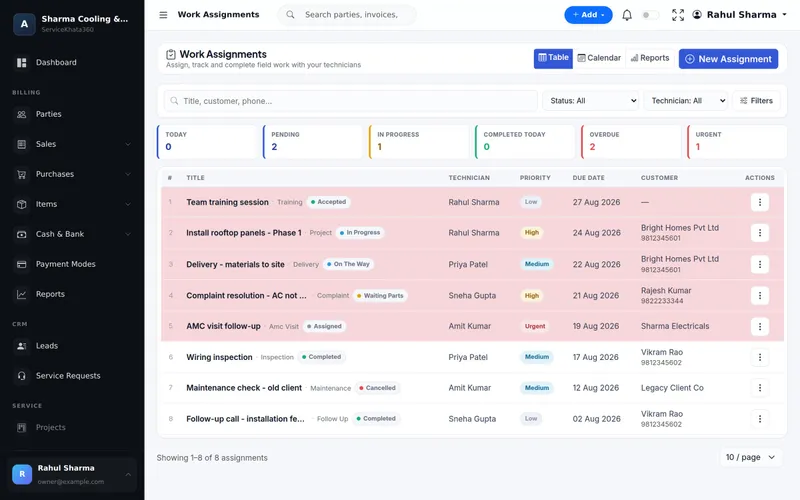
Most RO businesses assign calls by whoever picks up the phone. A better rule considers three things:
- Area — group calls by locality so a technician does four jobs in one area instead of crossing the city.
- Skill — commercial plants, electrical faults and new installations may need a senior technician.
- Workload — check how many jobs each technician already has before adding more.
Each assignment should carry the customer's name, phone, address, problem description and due date, so the technician does not need to call the office for basic details.
Step 4: Track status through the day
The office should be able to answer "where is the technician?" and "is my job done?" without phoning anyone. A few clear statuses are enough:
- Assigned / Accepted — the technician has the job
- On the way / In progress — the visit has started
- Waiting for parts — a membrane or pump needs to be ordered
- Waiting for customer — house locked, customer asked to reschedule
- Completed — work done, notes recorded
"Waiting for parts" is the most important one to watch. Every job in that status is a purchase decision; review those jobs with whoever handles stock every morning.
Step 5: Close the call properly
A complaint is not finished when the technician leaves. Before closing, check that:
- The technician has recorded what was done and which parts were replaced
- Chargeable parts and the service charge are billed — or noted as covered under warranty or AMC
- The customer has confirmed the purifier is working
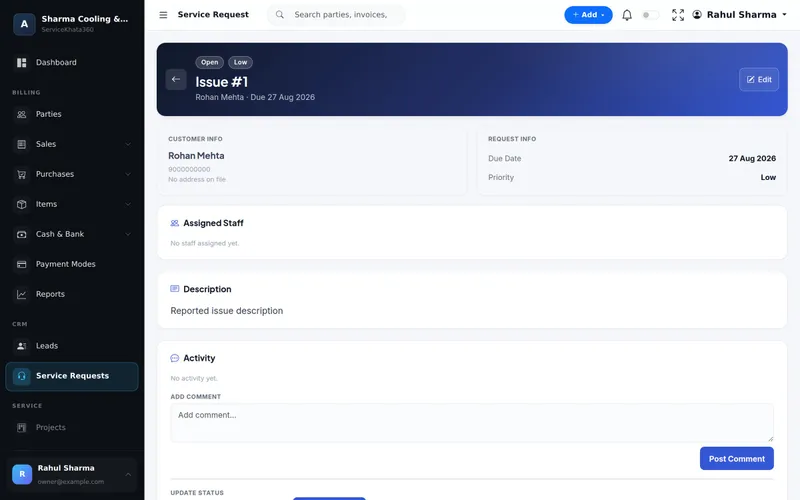
It helps to separate Resolved (the technician fixed it) from Closed (the office confirmed with the customer and finished billing). That way tickets are not closed before the customer agrees.
Step 6: Use service history to work smarter
Once every complaint sits on the customer record, history becomes useful:
- A technician arriving for a "low flow" call can see the membrane was replaced eight months ago.
- Repeat complaints on the same unit within a few weeks show up immediately — send a senior technician the second time.
- Customers who call for repairs several times a year are natural AMC prospects. See how to manage RO AMC customers and renewals.
A daily routine for the service desk
- Morning: review overdue and today's calls; reassign anything a technician cannot reach.
- Mid-day: check "waiting for parts" jobs and confirm orders with the supplier.
- Evening: confirm completed jobs are billed; follow up with any customer whose job moved to tomorrow.
Mistakes that cost RO businesses repeat calls
- Taking complaints on personal WhatsApp and forwarding them to technicians as screenshots.
- Vague subjects like "service" that tell nobody anything.
- No record of what the technician did, so the next visit starts from zero.
- Closing jobs before parts are billed.
- Assigning every urgent call to the same experienced technician until they burn out.
How ServiceKhata360 handles RO service calls
In ServiceKhata360, each complaint is a service request against the customer, with subject, description, priority, due date and assigned staff. Its status moves through Open, In Progress, Resolved and Closed, and an activity log keeps comments and status updates on the request. The list shows Open, In Progress, Resolved and Overdue counts, and a request can be linked to the specific unit (asset) it concerns, identified by its serial number.
Technician jobs are managed as work assignments with a technician, priority, due date and status — Assigned, Accepted, On The Way, In Progress, Waiting Parts, Waiting Customer, Completed or Cancelled — with table, calendar and report views. Roles have granular permissions, so a technician can sign in and see only the work assigned to them. With your WhatsApp number linked (a one-time QR scan), optional workflows can confirm a new service request to the customer and send the assigned technician the job details. Complaint reports cover ageing, resolution, priority, assignee and customer summaries.
See how service calls connect to AMC, billing and stock on the RO service management software page, or read about the complaint management module.
Frequently Asked Questions
What details should be taken when an RO complaint is registered?
What is the difference between Resolved and Closed?
Can technicians see only their own jobs?
Can customers get a WhatsApp message when their complaint is logged?
Looking for one system to manage your RO service business?
See ServiceKhata360 with your own workflow — complaints, technicians, filter-change visits, billing and AMC renewals.